
Embark on a journey through the realm of interaction design, where creativity meets functionality to shape the user experience in innovative ways.
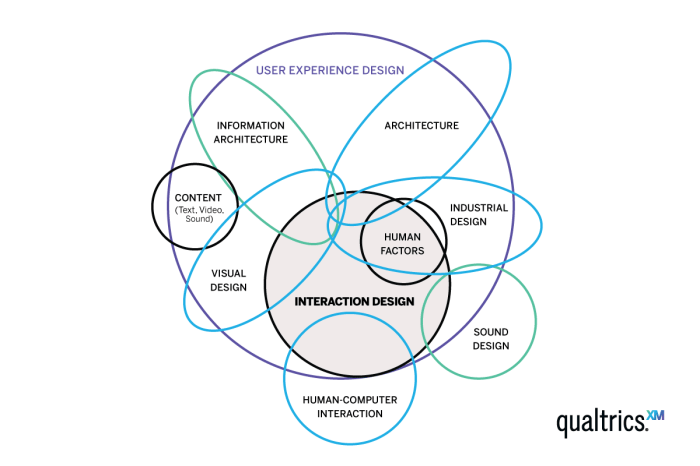
As we delve deeper into the intricacies of interaction design, we uncover its significance in modern product development and explore examples of exceptional design in everyday products.
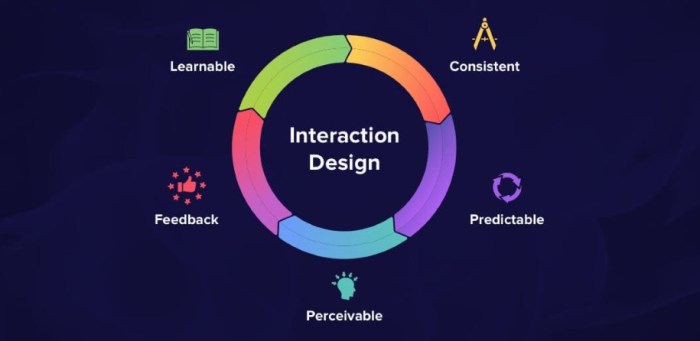
Principles of Interaction Design
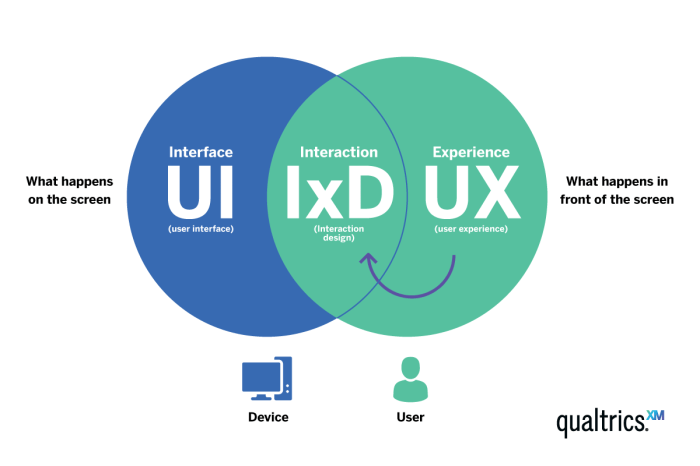
Interaction design is a crucial aspect of creating user-friendly interfaces across various platforms. By following key principles of interaction design, designers can ensure that users have a seamless and intuitive experience while interacting with a product or system.
Consistency
Consistency is a fundamental principle in interaction design that focuses on maintaining uniformity throughout the interface. This includes using consistent layouts, fonts, colors, and interactions across different screens or pages. Consistency helps users navigate the interface more easily, as they can predict how elements will behave based on their past interactions.
Feedback
Feedback is another essential principle that enhances user experience by providing users with immediate responses to their actions. This can be in the form of visual cues, such as button animations or color changes, or auditory cues like error sounds.
Feedback helps users understand the outcome of their actions and guides them in making informed decisions.
Affordance
Affordance refers to the perceived action possibilities of an element within the interface. Design elements should clearly communicate their functionality to users, indicating how they can interact with them. For example, a button should visually appear clickable to convey its affordance to users.
By designing with affordance in mind, designers can make interactions more intuitive for users.
Hierarchy
Hierarchy in interaction design helps users prioritize information and actions based on their importance. By establishing a clear hierarchy of elements, such as using larger fonts for headings and smaller fonts for body text, designers can guide users' attention and streamline their interactions.
A well-defined hierarchy ensures that users can easily navigate the interface and find what they are looking for.
User Control
User control is a principle that empowers users to interact with the interface at their own pace and preference. Providing options for customization, such as adjustable settings or personalized preferences, gives users a sense of ownership and control over their interactions.
By allowing users to control their experience, designers can cater to a diverse range of user needs and preferences.
User-Centered Design Approach
User-centered design in interaction design revolves around creating products or systems that prioritize the needs, preferences, and behaviors of the end users. This approach involves involving users throughout the design process to ensure that the final product meets their expectations and is intuitive to use.
Gathering User Feedback
One method for gathering user feedback during the design process is conducting user interviews or surveys to understand user needs and pain points. Usability testing, where users interact with prototypes or the actual product to identify usability issues, is another effective way to gather feedback.
Additionally, observing users in their natural environment can provide valuable insights into how they interact with technology.
- Conducting user interviews and surveys
- Usability testing with prototypes
- Observing users in their natural environment
Examples of Successful Products
User-centered design has played a pivotal role in shaping successful products such as the iPhone by Apple. The iPhone's intuitive interface, based on user feedback and testing, revolutionized the smartphone industry. Another example is the design of Google Search, which continuously incorporates user feedback to improve the search experience and deliver relevant results efficiently.
- iPhone by Apple
- Google Search
Prototyping and Testing
Prototyping and testing are crucial stages in the interaction design process, allowing designers to create and refine their designs based on user feedback and behavior.
Prototyping involves creating a preliminary version of the design to test its functionality, usability, and overall user experience. It helps designers visualize the final product and identify any potential issues early in the design process.
Prototyping Techniques
- Low-Fidelity Prototypes: These are quick, basic sketches or wireframes that focus on the layout and structure of the design without much detail.
- High-Fidelity Prototypes: These prototypes are more detailed and interactive, closely resembling the final product in terms of design and functionality.
- Interactive Prototypes: These prototypes allow users to interact with the design, providing a realistic experience and valuable feedback.
Importance of User Testing
User testing is essential in refining interaction design as it provides direct feedback from the target users. By observing how users interact with the prototype, designers can identify usability issues, pain points, and areas for improvement.
Accessibility in Interaction Design
In the realm of interaction design, accessibility refers to the practice of creating digital interfaces that can be easily used and navigated by individuals with disabilities. This includes designing websites, applications, and other digital products in a way that ensures all users can access and interact with the content effectively.
Best Practices for Designing Accessible Interfaces
When designing interfaces with accessibility in mind, it's crucial to follow best practices to ensure inclusivity and usability for all users. Some key considerations include:
- Providing alternative text for images to assist visually impaired users
- Using clear and simple language for content readability
- Ensuring proper color contrast for users with visual impairments
- Implementing keyboard navigation for users who cannot use a mouse
- Providing captions and transcripts for multimedia content
Impact of Accessible Design on User Engagement and Inclusivity
Designing with accessibility in mind not only benefits users with disabilities but also enhances the overall user experience for everyone. By creating interfaces that are easy to navigate and understand, you can improve user engagement and inclusivity. Accessible design helps in reaching a broader audience and ensures that all users can interact with your product effectively, leading to increased satisfaction and usability.
Closing Notes
In conclusion, interaction design serves as the bridge between users and technology, paving the way for seamless experiences that captivate and inspire. Dive into the world of interaction design and witness the transformative power it holds in shaping the future of user interactions.
Commonly Asked Questions
What is the primary goal of interaction design?
The primary goal of interaction design is to create meaningful and intuitive experiences for users interacting with products or systems.
How does user-centered design differ from traditional design approaches?
User-centered design prioritizes the needs and preferences of users throughout the design process, ensuring that the final product resonates with its intended audience.
Why is accessibility important in interaction design?
Accessibility ensures that individuals with disabilities can use and interact with digital interfaces effectively, promoting inclusivity and equal access to information.